[WOOCOMMERCE] LIST OF WOOCOMMERCE WIDGETS
![[WOOCOMMERCE] LIST OF WOOCOMMERCE WIDGETS](https://bestcareco.com/uploads/_thumbs/hero/2026/10/lo-hong-nghiem-trong-cua-plugin-wordpress-noi-tieng-woocomme-c2d4db.jpg.webp)
To make your website interface more diverse and convenient for user navigation, you certainly cannot rely only onwidgetto insert intosidebarof the interface. InWooCommerce, it includes several useful widgets that if you apply flexibly, you can display products or store-related features better. In this article, I'll list some WooCommerce widgets and their purpose. Since some widgets are translated into Vietnamese rather…confusingly, I'll include the English widget name for clarity.
Using widgets
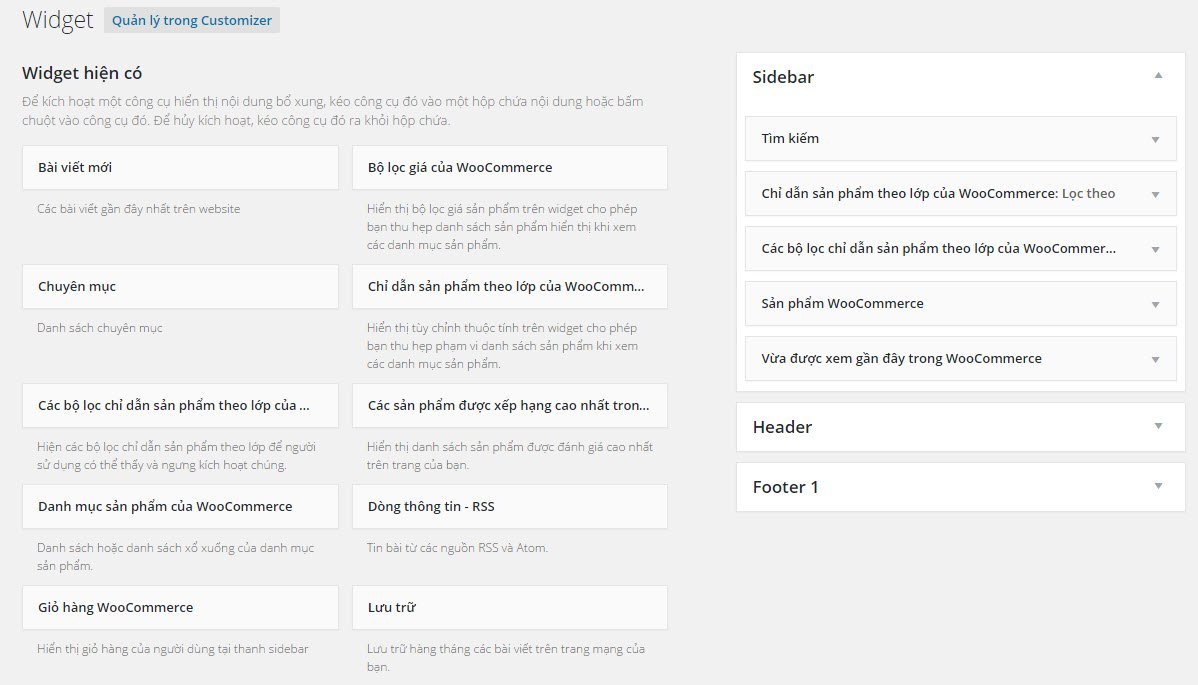
Using WooCommerce widgets is the same as using other widgets—you drag them into your theme's sidebar to display. Configure atAppearance -> Widgets.
List of WooCommerce widgets
- WooCommerce Cart (WooCommerce Cart)– Displays a mini cart; when you add a product, it will list the products in your cart.
- WooCommerce Product Attribute Filter (WooCommerce Layered Nav)– Simply put, it's a product filter by attributes in products with variations. This widget can only be displayed on the Shop page (the archive page for products).
- WooCommerce Layered Navigation Filter (WooCommerce Layered Nav Filters)– Displays the attributes you're currently filtering to view products with the WooCommerce Layered Nav widget; the purpose is to let customers know which attributes they're filtering so they can remove it.
- WooCommerce Price Filter (WooCommerce Price Filter)– Displays a slider to select a price range for viewing products. For example, you can view products priced from 1,000,000 to 5,000,000, with the maximum value based on the highest-priced product. This widget can only be displayed on the Shop page (product archive page).
- WooCommerce Product Categories (WooCommerce Product Categories)– Displays a list of product categories available on the website.
- WooCommerce Products (WooCommerce Products)– Displays a list of products in the store, with options to customize the number of products shown, display featured products, display discounted products, and sort by (date, random, best-selling, and price).
- WooCommerce Product Search (WooCommerce Product Search)– Displays a search box that searches only products.
- WooCommerce Product Tags (WooCommerce Product Tags)– Displays product tags in cloud format.
- WooCommerce Recent Reviews (Woocommerce Recent Reviews)– Displays the most recent product reviews, including the number of star ratings.
- WooCommerce Recently Viewed (WooCommerce Recent Viewd)– Displays products that customers have recently viewed.
- WooCommerce Top Rated Products (WooCommerce Top Raterd Products)– A list of products with the most user ratings.
Guide to Some Featured Widgets
WooCommerce Product Attribute Filter
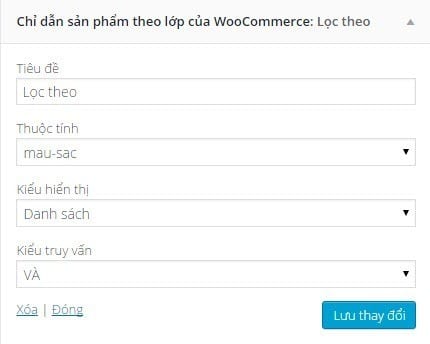
First, remember that this widget only displays when you view the Shop page; other pages will not show it, including product category pages and product tag pages. Add it to any sidebar and it will display on the Shop page. In a future post, I'll cover WooSidebars to create alternative sidebars for each page. When you open this widget's options, you have the following settings:
- Title: The display title of the widget on the front end.
- Attribute: Select the attribute to filter products by; here it will display the attribute slug so there are no accents.
- Display Type: Choose how to display the filter; typically using List will look better.
- Query Type:
- AND: Display only products with attributes matching all your selected options. For example, if you select Red and Black colors, the AND query will only show products that have both Red and Black attributes.
- OR: Display products that have one or more of the attributes you are selecting.
WooCommerce Products
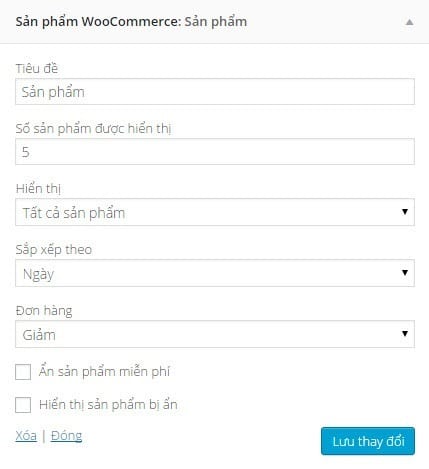
This widget is commonly used because it supports many excellent product display methods (except viewing products by category or keyword). It has several options such as:
- Title:The display title of the widget outside the interface.
- Number of products displayed: Customize the maximum number of products that will be displayed.
- Display:
- All products– Display all products in the customized sort order below.
- Featured products– Display all featured products in the customized sort order below.
- Sale products– Display all discounted products in the customized sort order below.
- Sort by:
- Date– Sort products by date order.
- Price– Sort products by price.
- Random– Sort products in random order.
- Sales– Sort products by sales volume.
- Order(must be translated asSortnot asOrdersthat would be wrong):
- Descending– Sort products in descending order.
- Ascending– Sort products in ascending order.
Some plugins for WooCommerce widgets
The default widgets in WooCommerce may not fully meet your needs, so try checking out some plugins that support creating additional widgets for WooCommerce. Free- YITH WooCommerce AJAX Product Filter– Support for creating additional product filters, including support for color attribute value types as I've guided in previous posts.
- XoX Woocommerce Slider/Carousel– This plugin creates a small slider displaying products and supports a widget to display the slider.
- Search by SKU for Woocommerce– Add a widget to search products by SKU code.
- WooCommerce My Account Widget– Widget displaying login form and links to WooCommerce account pages.
- XO10 – WooCommerce Categories widget– Display a list of product categories with thumbnail images.
- WC Products By Category Widget– Display products by category, with diverse customization options similar to WooCommerce's default Products widget.
- Woocommerce Similar Category Products Widget– Display products from the same category.
- WooCommerce Product Filter– Professional product filtering bar.
- WooCommerce Sales Countdown– Display countdown timer to discount programs.
- WooCommerce Ajax Drop Down Cart– Add a mini cart widget with AJAX support.
- Shop Assistant for WooCommerce– Virtual assistant for customers.
- WooCommerce Currency Switcher– Widget supporting automatic currency conversion by exchange rate.
- WooCommerce Cart – WooCart Pro– Automatically display mini cart on attractive menu.